If you recently bought a computer with an AMD processor or AMD Radeon graphics card, you have probably seen software installed on your system called AMD Software. Many users ask the same question: what is AMD software, what does it do, and do you really need it?
The simple answer is yes. AMD software is an important collection of drivers, utilities, and optimization tools developed by Advanced Micro Devices (AMD). It helps your computer communicate with AMD hardware, improves gaming performance, updates drivers, enhances graphics quality, monitors system performance, and unlocks advanced features that would otherwise remain unavailable.
Whether you are a gamer, video editor, student, content creator, or everyday PC user, AMD software plays an important role in making your computer perform at its best. Without the correct AMD software, your graphics card or processor may not deliver its full potential.
In this complete guide, you’ll learn everything about what is AMD software, how it works, the different AMD software packages available, their features, benefits, installation process, common problems, and whether you should keep it installed. Along the way, you’ll also discover practical tips and expert insights that go beyond the basic explanations found on most websites.
This guide is written for beginners while providing enough depth for experienced users looking to better understand AMD’s software ecosystem.
What Is AMD Software?
The answer to “what is AMD software” is straightforward.
AMD Software is the official software platform created by AMD to manage, optimize, and update AMD hardware. It acts as the bridge between your operating system and AMD components, ensuring that everything works together efficiently.
AMD software includes:
- Graphics drivers
- Processor chipset drivers
- Gaming optimization tools
- Performance monitoring
- Display customization
- Driver updates
- Recording and streaming features
- System tuning utilities
Instead of installing several separate programs, AMD combines many useful features into one easy-to-use application.
Modern AMD Software is designed with simplicity in mind. Even users with little technical knowledge can update drivers, optimize games, and monitor hardware performance with only a few clicks.
Why AMD Software Is Important
Many people think drivers only help a computer recognize hardware. While that is true, modern AMD software goes much further.
It continuously improves your PC experience by delivering:
- Better gaming performance
- Increased system stability
- Compatibility with new games
- Support for the latest Windows updates
- Security improvements
- Bug fixes
- Lower power consumption
- Better display quality
AMD releases software updates throughout the year. These updates often improve performance in newly released games without requiring users to upgrade their graphics card.
For example, a driver update may improve frame rates in a popular game by several percentage points simply through software optimization.
This ongoing support is one reason AMD hardware remains competitive over many years.
How AMD Software Works
Understanding how AMD software works makes it easier to appreciate why it matters.
Every piece of hardware requires instructions so Windows knows how to communicate with it. Those instructions are called drivers.
AMD software installs these drivers while also providing management tools that allow users to control various hardware settings.
The software performs several jobs simultaneously:
- Detects AMD hardware
- Installs proper drivers
- Optimizes communication with Windows
- Adjusts graphics settings
- Monitors temperatures
- Updates drivers automatically
- Improves compatibility with new applications
- Tunes hardware performance
Think of AMD software as the control center for AMD hardware.
Without it, Windows would only use basic drivers that lack advanced features and often deliver lower performance.
Who Needs AMD Software?
Almost every AMD hardware owner benefits from installing AMD software.
Also Read: What Are Some YouTube to MP4 Software for PC? A Complete Guide to Legal, Safe, and Reliable Options
It is useful for:
- Gamers
- Graphic designers
- Engineers
- Video editors
- Students
- Streamers
- Business users
- Home computer owners
Even if you only browse the internet or watch videos, AMD software helps ensure smooth graphics performance and better compatibility.
For gamers and creators, the benefits become even greater because they rely heavily on graphics processing power.
What Is AMD Software Adrenalin Edition?
One of the most common questions users ask is what is AMD Software Adrenalin Edition.
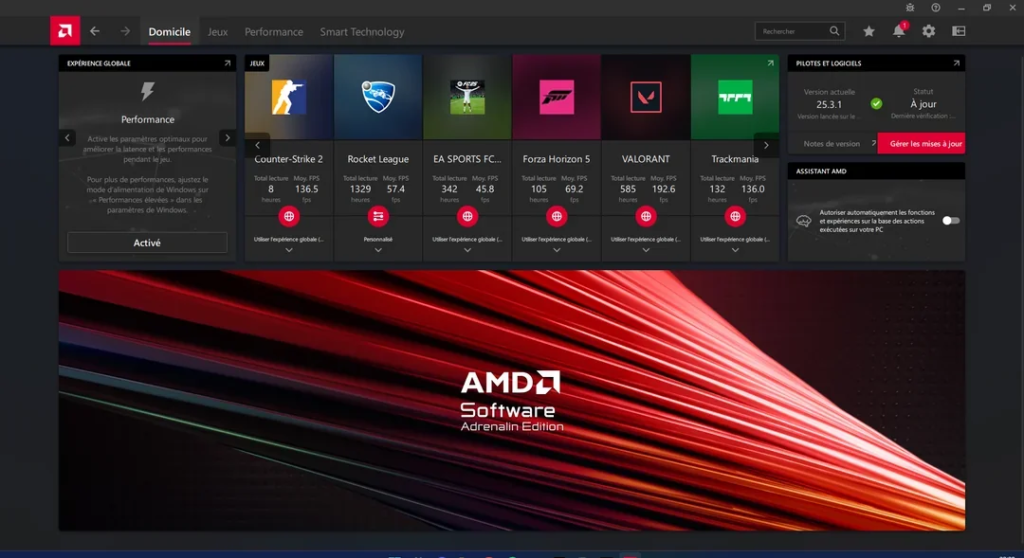
AMD Software: Adrenalin Edition is AMD’s flagship graphics software package for Radeon graphics cards.
It combines graphics drivers with numerous advanced features in one application.
Instead of installing only drivers, users receive a complete performance management platform.
Major features include:
- Automatic driver updates
- Performance tuning
- Radeon Super Resolution
- HYPR-RX optimization
- Frame generation support (on compatible hardware)
- Radeon Anti-Lag
- Radeon Boost
- Game profiles
- Recording gameplay
- Live streaming
- Screenshot capture
- Performance metrics
- Custom fan controls
Adrenalin Edition has evolved significantly over the years. Earlier AMD software focused mainly on installing drivers, while today’s version offers an all-in-one dashboard for gaming, productivity, and hardware management.
For most Radeon graphics card owners, Adrenalin Edition is the recommended software package.
Key Features of AMD Software Adrenalin Edition
AMD continues expanding Adrenalin Edition with features designed to improve real-world experiences rather than simply adding technical options.
Some standout capabilities include:
Intelligent Driver Management
The software checks for certified driver updates and installs them quickly.
This reduces compatibility issues and ensures support for the latest games.
Performance Monitoring
Users can monitor:
- GPU usage
- CPU usage
- VRAM utilization
- Temperature
- Fan speed
- Clock speed
- FPS
- Power consumption
This information helps diagnose performance issues without installing third-party tools.
Game Optimization
Many games receive automatic optimization profiles.
AMD adjusts settings to balance visual quality and performance depending on your hardware.
One-Click Performance Presets
Instead of manually changing dozens of settings, users can select profiles focused on:
- Performance
- Balanced mode
- Quiet operation
- Power saving
This makes optimization much easier for beginners.
Recording and Streaming
Content creators can capture gameplay directly inside AMD Software.
There is no need to install additional recording utilities unless advanced editing features are required.
What Is AMD Radeon Software?
Another frequently searched question is what is AMD Radeon Software.
AMD Radeon Software refers to the software platform designed specifically for AMD Radeon graphics cards.
Over time, AMD has updated its branding.
Today, Radeon Software has evolved into AMD Software: Adrenalin Edition.
Many websites still use the older name, which causes confusion among users.
Essentially:
AMD Radeon Software = the graphics management software for Radeon GPUs.
It includes:
- Display settings
- Graphics drivers
- Gaming optimization
- Performance tuning
- Video enhancement
- Radeon Image Sharpening
- AMD Fluid Motion technologies (supported systems)
- Display scaling
- Multi-monitor configuration
If your computer has an AMD Radeon graphics card, this software is one of the most important applications installed on your system.
What Is AMD Chipset Software?
Another common question is what is AMD chipset software.
Unlike Radeon Software, AMD Chipset Software is designed for AMD processors and motherboard chipsets rather than graphics cards.
It installs essential drivers that allow Windows to communicate efficiently with the motherboard.
These drivers manage communication between:
- CPU
- Memory
- USB ports
- PCI Express devices
- Storage controllers
- Power management systems
Without chipset software, Windows may still function, but some hardware features may not work correctly or efficiently.
Chipset software improves:
- Boot speed
- System responsiveness
- Power efficiency
- USB stability
- Processor scheduling
- Storage performance
Many users mistakenly believe chipset drivers are optional.
In reality, they are just as important as graphics drivers for achieving reliable system performance.
What Is AMD Catalyst Software?
Many longtime AMD users still ask what is AMD Catalyst software.
AMD Catalyst Software was AMD’s graphics driver suite before the introduction of Radeon Software.
For many years, Catalyst Control Center served as the main management application for AMD graphics cards.
It included:
- Display settings
- Driver installation
- Graphics configuration
- Multi-monitor support
- Video playback controls
Although Catalyst was successful, AMD eventually redesigned its software from the ground up.
The progression looks like this:
AMD Catalyst Software
↓
AMD Radeon Software Crimson Edition
↓
AMD Radeon Software
↓
AMD Software: Adrenalin Edition
If you own an older graphics card, you may still encounter Catalyst Software.
However, modern AMD graphics cards use Adrenalin Edition instead.
The Different Types of AMD Software
Many people think AMD only offers one software package.
In reality, AMD develops multiple software solutions for different hardware categories.
The major categories include:
Graphics Software
Designed for Radeon graphics cards.
Chipset Software
Supports Ryzen processors and AMD motherboards.
Professional Software
Optimized for workstation graphics cards used in engineering, architecture, animation, and scientific computing.
Enterprise Drivers
Focused on business stability, long-term support, and certified applications.
AI and Compute Drivers
Used for machine learning, artificial intelligence, and high-performance computing workloads.
Each software package serves a unique purpose while sharing AMD’s goal of maximizing hardware performance.
Benefits of Keeping AMD Software Updated
One mistake many users make is installing AMD software once and never updating it again.
Keeping the software current offers several advantages.
Regular updates provide:
- Better game compatibility
- Improved driver stability
- Higher frame rates
- New features
- Security improvements
- Support for new graphics technologies
- Reduced crashes
- Better hardware efficiency
In many cases, software updates improve performance without requiring new hardware.
For users who want the longest lifespan from their computers, staying current with AMD software updates is one of the easiest and most effective maintenance habits.
How to Install AMD Software
Installing AMD software is a simple process, even if you are not familiar with computer hardware. AMD has designed its software to automatically detect compatible hardware and install the correct drivers.
Follow these steps to install AMD software:
- Visit AMD’s official website.
- Download the correct software for your graphics card or processor.
- Run the installer.
- Allow the software to detect your hardware.
- Install the recommended drivers.
- Restart your computer if prompted.
After installation, AMD Software launches automatically and displays your system information, driver version, and available updates.
For most users, the automatic installation option is the best choice because it minimizes the risk of selecting the wrong driver.
Alsov Read: What Are Operating Software? A Complete Beginner’s Guide to Operating System Software
How to Update AMD Software
AMD frequently releases updates that improve performance, stability, and compatibility with new games and applications.
Updating AMD software is easy.
Open AMD Software and navigate to the Updates section. The software checks whether a newer driver is available. If an update exists, download and install it.
Regular updates provide several advantages, including:
- Better gaming performance
- Support for newly released games
- Improved security
- Bug fixes
- Enhanced stability
- New software features
- Better compatibility with Windows updates
Many gamers install new AMD drivers as soon as they are released because optimized drivers often improve performance in the latest titles.
Top Features That Make AMD Software Stand Out
AMD Software has grown into one of the most complete hardware management suites available.
Some of its most valuable features include:
Radeon Super Resolution
Radeon Super Resolution (RSR) uses advanced upscaling technology to increase frame rates while maintaining impressive image quality.
This feature allows users to play demanding games more smoothly without significantly reducing visual detail.
AMD HYPR-RX
HYPR-RX combines several AMD performance technologies into one simple setting.
Instead of enabling multiple options individually, users can activate HYPR-RX and allow the software to optimize gaming automatically.
This feature is especially useful for beginners.
Radeon Anti-Lag
Input lag can make games feel slow and less responsive.
Radeon Anti-Lag reduces the delay between player input and on-screen action, providing smoother gameplay in competitive titles.
Radeon Boost
During fast movement, Radeon Boost dynamically lowers rendering resolution to improve frame rates.
When the action slows down, full image quality returns automatically.
Radeon Image Sharpening
This feature enhances image clarity without causing a major performance loss.
Many players prefer it because it makes games appear sharper while maintaining high frame rates.
Performance Overlay
The built-in performance overlay displays important information while gaming, including:
- FPS
- GPU usage
- CPU usage
- VRAM usage
- Temperature
- Clock speed
- Fan speed
There is no need to install separate monitoring software.
One-Click Overclocking
AMD Software offers automatic performance tuning for supported hardware.
Instead of manually adjusting dozens of settings, users can safely increase performance with a single click.
Gaming Benefits of AMD Software
Gaming is one of the primary reasons people install AMD Software.
Modern games demand efficient communication between the operating system, graphics card, processor, and memory.
AMD Software helps coordinate all of these components.
Some gaming benefits include:
- Higher frame rates
- Reduced stuttering
- Better image quality
- Lower input lag
- Faster driver optimization for new games
- Improved power efficiency
- Stable graphics performance
AMD often releases Game Ready driver updates shortly before major game launches.
These updates improve compatibility and may increase performance immediately after installation.
Content Creation Benefits
AMD Software is not only designed for gamers.
Content creators also benefit from its features.
Whether you edit videos, create animations, design graphics, or stream online, AMD Software provides useful tools.
Benefits include:
- Hardware acceleration
- Better rendering performance
- Video encoding support
- Recording features
- Streaming integration
- Performance monitoring during editing
Many creative applications use AMD GPU acceleration to reduce rendering times and improve workflow efficiency.
Business and Professional Advantages
Businesses using AMD hardware also gain value from AMD Software.
Professional users often require stability rather than maximum gaming performance.
AMD provides enterprise drivers that focus on:
- Long-term stability
- Certified application support
- Improved reliability
- Security updates
- Professional graphics optimization
These drivers are commonly used in engineering, architecture, medical imaging, scientific research, and financial analysis.
Common AMD Software Problems
Although AMD Software is generally reliable, users occasionally experience problems.
Some common issues include:
- Driver installation errors
- Black screen after update
- Game crashes
- Performance drops
- Display flickering
- Missing software interface
- Update failures
Most problems are caused by outdated Windows installations, incorrect drivers, hardware conflicts, or interrupted updates.
Fortunately, AMD regularly releases fixes through software updates.
How to Troubleshoot AMD Software
If AMD Software is not working correctly, try these troubleshooting steps.
Restart your computer.
Many temporary driver issues disappear after a restart.
Update Windows.
Older Windows versions may not fully support newer AMD drivers.
Install the latest AMD driver.
Using outdated drivers can cause compatibility problems.
Perform a clean installation.
AMD allows users to remove previous drivers before installing fresh ones.
Reset AMD Software settings.
Incorrect graphics settings sometimes lead to unexpected behavior.
Check hardware temperatures.
Overheating can cause performance problems that appear to be software issues.
If problems continue, AMD’s official support resources provide troubleshooting guides for specific hardware models.
Should You Remove AMD Software?
Some users wonder whether AMD Software is necessary.
In most situations, the answer is no—you should keep it installed.
Removing AMD Software may result in:
- Lower graphics performance
- Missing hardware features
- Limited display options
- Reduced gaming performance
- Generic Windows drivers replacing optimized AMD drivers
Only uninstall AMD Software if you are replacing your AMD hardware or troubleshooting a specific driver issue.
For everyday users, keeping the software installed is strongly recommended.
AMD Software vs NVIDIA Software
AMD and NVIDIA both provide software that manages graphics hardware.
While both platforms perform similar functions, they have different strengths.
AMD Software is known for:
- Clean interface
- Easy navigation
- Extensive built-in tuning tools
- Free access to most features
- Integrated recording and performance monitoring
NVIDIA’s software is known for:
- Broad support across many professional applications
- Advanced AI-powered graphics features on supported hardware
- Mature ecosystem for certain creator workflows
For many users, AMD Software offers an excellent balance between simplicity, performance, and functionality without requiring additional utilities.
AMD Software Security
Security has become increasingly important for hardware drivers.
AMD regularly releases updates that address security vulnerabilities and improve software reliability.
To stay protected:
- Download drivers only from AMD’s official website.
- Install updates regularly.
- Avoid unofficial driver packages.
- Keep Windows updated.
- Enable automatic notifications inside AMD Software.
Using official software helps protect your computer from malware disguised as graphics drivers.
Expert Tips for Getting the Most Out of AMD Software
Many users install AMD Software but never explore its advanced features.
Here are a few practical tips:
- Enable automatic driver notifications.
- Monitor GPU temperatures during demanding tasks.
- Use game-specific graphics profiles.
- Update chipset drivers along with graphics drivers.
- Keep Windows fully updated.
- Avoid unnecessary third-party GPU optimization programs.
- Use performance metrics to identify bottlenecks.
- Restart your PC after major driver updates.
These simple habits can improve stability and extend the life of your hardware.
Common Myths About AMD Software
Several misconceptions continue to circulate online.
Myth 1: AMD Software Only Matters for Gamers
False.
It improves performance for general computing, content creation, business applications, and multimedia tasks.
Myth 2: Windows Updates Replace AMD Software
False.
Windows may install basic drivers, but they usually lack the advanced features available in AMD’s official software.
Myth 3: Driver Updates Always Reduce Performance
False.
Most updates improve compatibility, fix bugs, and optimize performance for newer applications.
Myth 4: Older PCs Do Not Need AMD Software
False.
Even older AMD hardware benefits from compatible drivers that improve stability and functionality.
The Future of AMD Software
AMD continues investing in software innovation alongside its hardware development.
Also Read: How to Flash Software on LCD Controller: The Complete Guide
Future versions are expected to place even greater emphasis on:
- Artificial intelligence integration
- Smarter automatic optimization
- Improved power efficiency
- Enhanced creator tools
- Better gaming technologies
- Advanced frame generation
- Improved upscaling technologies
- Expanded cloud gaming support
As gaming, AI, and professional workloads become more demanding, AMD Software will remain a critical part of delivering the best possible user experience.
Final Thoughts
If you’ve been wondering what is AMD software, the answer is much broader than simply “a driver.”
AMD Software is a complete hardware management platform that allows AMD processors and Radeon graphics cards to perform at their full potential. It installs essential drivers, improves compatibility, enhances gaming performance, provides advanced graphics features, monitors system health, and keeps your hardware updated with the latest improvements.
Whether you’re learning what is AMD Catalyst software, exploring what is AMD chipset software, understanding what is AMD Software Adrenalin Edition, or asking what is AMD Radeon software, each component serves a specific purpose within AMD’s larger ecosystem.
For everyday users, AMD Software ensures a stable and responsive computer. For gamers, it delivers higher frame rates, lower latency, and advanced graphics enhancements. For professionals and creators, it provides the performance, reliability, and optimization needed for demanding workloads.
Keeping AMD Software updated is one of the easiest ways to maximize your computer’s performance, improve security, and extend the lifespan of your AMD hardware. As AMD continues introducing new technologies, its software will remain an essential tool for unlocking the full capabilities of modern PCs.
Frequently Asked Questions (FAQs)
Is AMD Software free to use?
Yes. AMD Software is completely free for owners of supported AMD processors and Radeon graphics cards.
Can AMD Software improve FPS in games?
Yes. Updated drivers and built-in optimization features can improve frame rates and overall gaming performance in many supported games.
Do I need AMD Software if Windows already installed drivers?
Yes. Windows usually installs basic drivers, while AMD Software provides advanced features, better optimization, performance tools, and regular updates.
How often should I update AMD Software?
Checking for updates once every month is a good practice. Gamers may prefer updating whenever AMD releases optimized drivers for newly launched games.
Does AMD Software slow down my PC?
No. It is designed to improve performance rather than reduce it. On modern systems, it uses minimal background resources.
Can I install AMD Software on a laptop?
Yes, provided your laptop includes supported AMD Ryzen processors or AMD Radeon graphics. Some laptop manufacturers may also provide customized drivers for specific models.
Is AMD Software safe to download?
Yes. It is safe when downloaded from AMD’s official website. Avoid downloading drivers from unknown third-party sources.
What happens if AMD Software is accidentally deleted?
Your computer will still function, but you may lose advanced graphics features and optimized drivers. Reinstalling the latest version restores full functionality.
Can AMD Software update chipset drivers automatically?
Depending on your hardware and software configuration, AMD provides notifications for chipset updates, but users should also periodically check for the latest versions.
Does AMD Software support multiple monitors?
Yes. It includes tools for configuring multi-monitor setups, adjusting display scaling, changing resolutions, managing refresh rates, and customizing display arrangements.

